
Looking to automate your rental income with property management software or a rent app? Avail rent collection is likely on your list. The all-in-one landlord platform benefits both sides of the lease agreement.
Tenants can easily set up autopay to pay their monthly bill with zero effort. At the same time, landlords get quick access to funds. ACH transfers take 5–7 days, but paid account holders get next-day payouts. Debit and credit cards take 1–2 days across all plans.
All in all, Avail gives tenants the flexibility to pay rent with a secure bank account transfer, debit card, or credit card. The online process, automatic payment reminders, and autopay tools encourage on-time payments — giving owners more control over their income. Here’s a quick review of how Avail rent collection works, and how it compares to other leading platforms, like TenantCloud.
TL;DR
Avail makes it easy to collect rent online. The software features property management automation, autopay, ACH, and card payment processing, automated fees and reminders, and built-in reporting tools. However, the fees and payout speeds vary depending on the plan you use. For example, the paid plan offers faster access to funds — in exchange for overhead.
When choosing a rent collection tool, always consider your specific needs. If you’re a small landlord with few units who wants software that’s easy for both owners and tenants, Avail rent collection is a strong option. However, TenantCloud’s software offers greater flexibility in accounting, property management, and fee structures.
Collecting Rent: Payment Methods and Bank Account Options
With Avail rent collection, tenants can pay using a few different methods, including:
- ACH transfers
- Credit cards
- Debit cards
To link a bank account for ACH transfers, tenants click on the “Bank Account” section of their tenant portal and select “Add Bank Account.” Avail offers Plaid to make the process fast, secure, and easy by signing into their online banking. Tenants can also manually enter their account and routing numbers.
When tenants want to pay rent with a card, they can click on the “Credit Cards” button on their tenant portal and select “Add Card.” Fill in the card details, including the user’s name, card number, expiration date, security code, and ZIP code. And that’s it!
Avail gives tenants the flexibility to choose their payment methods, so it’s up to the tenant to choose what’s best for them. For example, tenants often choose ACH as a cost-effective option because of its low fees. On the other hand, tenants use their credit cards to gain rewards points or to fill in the gaps between paychecks. While credit cards give tenants more control over their finances, they also charge fees if balances accumulate.
How Tenants Pay Rent: ACH, Debit Card, and Pay Rent Options
ACH uses secure, bank-level encryption to send rent directly from the tenant’s bank account to the landlord’s. Alternatively, credit or debit card payments withdraw funds from the tenant’s account, just like any online purchase. They charge the card and transfer the funds after the transaction goes through.
It’s a good idea to enable multiple payment options on Avail so tenants can make the best decision for themselves and their finances. Remember, the easier you make it to pay rent, the more you avoid missed and incomplete payments.
Speaking of incomplete payments, let’s discuss partial rent payments, which happen when a tenant pays a portion of the monthly rent amount. Avail allows tenants to make partial payments as a default. The platform doesn’t allow you to block incomplete payments like other property management software, such as TenantCloud.
Partial payment processing is great for roommates or if owners accept rent in installments, but there are downsides to consider. Allowing tenants to pay a portion of the rent can encourage late payments or delay eviction proceedings, depending on your state.
Consider your cash flow needs, the tenant's responsibility, and your local eviction laws before deciding to accept partial rent payments.
Fees: ACH Fees, Debit Card, and Other Processing Fees
Tenants pay $2.50 per ACH transfer, but Avail’s paid plan waives the fee — making the transactions free for both landlords and tenants. At the time of writing, the Unlimited account is free, and the Unlimited Plus is $9/residential rental property per month. When tenants use a credit or debit card for rent, they pay a 3.5% processing fee, regardless of the subscription the landlord has.
Unlike other platforms, landlords can’t opt to absorb the transaction fees to create a smoother experience for tenants. While they can upgrade their subscription to eliminate ACH fees, tenants still pay a processing fee when using a card.
Late Fees and Move-In Fees: Policy Setup
When you create your landlord account, you can customize each unit’s payment settings. You can add late fees, rent reminders, and grace periods as specified in your lease agreement.

At the start of a new tenancy, you can also create an automatic one-time move-in fee as an individual line item for better bookkeeping. However, you have to manually label and track the fees in the app’s accounting tools.
When it comes to late fees and grace periods, always check your state and local rental laws. Some areas cap late fees and require you to wait a few days before applying late payment penalties. For example, Washington law requires landlords to wait 5 days before charging a late fee (Wash. Rev. Code § 59.18.170). Additionally, Colorado limits late fees to $50 or 5% of the past-due rent, whichever is greater (Colo. Rev. Stat. § 38-12-105).
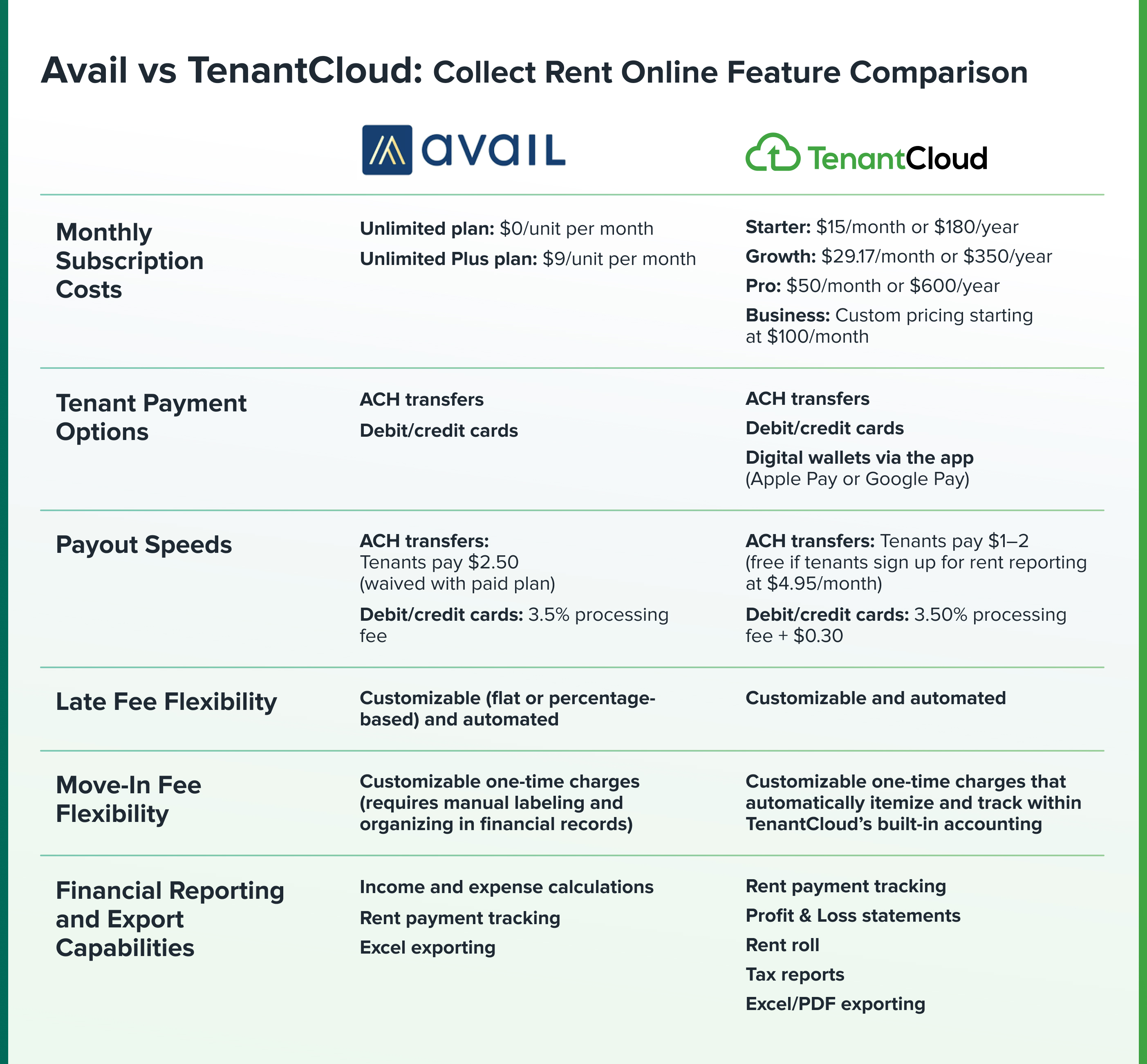
Avail vs TenantCloud: Collect Rent Online Feature Comparison
Next, let’s consider a side-by-side comparison between two of the top rent collection software in 2026: Avail and TenantCloud.
Always consider your needs, the tenant experience, and your business operations when choosing the rent payment software that works best for you.
Encourage On-Time Rent: Tools and Best Practices
To help keep your rental income flowing, follow these four best practices:
1. Set up automated payment reminders to send tenants a gentle nudge when rent is due.
2. Reward tenants for turning on autopay with incentives such as a small monthly discount, a one-time rent credit, or even a $25 Amazon gift card.
3. Offer rent reporting tools that submit on-time payments to credit bureaus, helping tenants build their credit score.
4. Send automated late-payment notices so tenants don’t forget about unpaid balances or wonder, “what is rent?”
Financial Reporting and Tax Exports When Collecting Rent
Avail rent collection includes property accounting to make bookkeeping easy. Landlords can manually add or edit transactions as needed to keep accurate, complete records.
Besides tracking income and expenses for each property, Avail streamlines tax prep with 1099-K forms and Excel exporting. Other platforms, such as TenantCloud, also export your financial information directly to a convenient PDF format.
To keep your finances clean and organized, reconcile your Avail reports each month. Start by matching your rental income, fees, and payouts to your bank statements. It’s a great way to catch any mistakes early and avoid confusion during tax season.
Payout Speeds and Moving Funds to Bank Account or Debit Card
With ACH, it takes about 5–7 days for the funds to be available in the landlord’s account. However, if you have an Unlimited Plus plan, owners get next-day deposits. Tenants can also pay their monthly bill with a credit or debit card. Card payments usually reach the owner's account in 1–2 days across all plans.
To access expedited deposits for ACH payments with your Unlimited Plus plan, turn on FastPay in your payment settings. Tenants must link their banks, schedule their payment in advance, and have the funds available in their account. After you enable FastPay, each eligible ACH payment will reflect in your bank account on the next business day.
Security, Compliance, and Recordkeeping While You Collect Rent
To mitigate risk for yourself and your tenants, here are a few tips:
- Enable two-factor authentication on Avail to prevent fraud.
- Keep your rent receipts on hand for at least 1 year after the tenancy ends.
- When tenants sign up for autopay, document their consent and store the record in your files.
- Follow all local rent-payment laws governing late fees, grace periods, rent increases, and payment methods.
Choosing Between Avail and TenantCloud: Decision Checklist
So, what’s the best rent collection software for you? If you’re deciding between Avail vs. TenantCloud, the first step is to consider your portfolio size and growth plan. Make sure the platform you choose will adapt to your business over time.
Next, think about the overhead. Always compare subscription costs and transaction fees to get a better understanding of what your monthly bill will be. For each platform, remember to think about the difference between monthly and annual costs. In many cases, the yearly price is less, but you have to pay in an upfront lump sum versus monthly installments.
Don’t forget to prioritize the software’s accounting and reporting capabilities. Review the platform’s financial features, including tax prep, income tracking, and export processes. Always check to see what accounting tools each plan offers. Sometimes, advanced financial tools are only available with paid upgrades.
Once you decide on your top two options for online rent payments, sign up for both to test the tenant experience. Using them on a live unit is the best way to avoid surprises. Performing a test run helps you analyze the differences between software so you can choose the best fit for your business.
So whether you go with Avail rent collection or another leading option like TenantCloud, you’re making an informed decision.
Avail Rent Collection FAQs
How does Avail collect rent?
Once tenants create their account, they can set up ACH or debit/credit card payments. Avail also enables autopay, making the process easy and hands-free.
How much does Avail cost for landlords?
Landlords can choose the free Unlimited plan, or the Unlimited Plus plan for $9/unit per month.
Is Avail a good rental company?
Avail is a reliable, legitimate all-in-one property management software. Landlords use it to create property listings, perform tenant screening, and offer online rent collection. Overall, Avail is user-friendly and budget-friendly. However, it may not be the ideal option for rental owners with large portfolios or those who want more advanced features. In these cases, TenantCloud is a leading alternative for landlords.


